Article
Agent Harness Explained: Why LLM Agents Need More Than Prompts and Tools
Most conversations about LLM agents start with the visible parts: the model, the prompt, and the tools.
That is understandable. The model produces the language. The prompt gives instructions. The tools let the agent search, write code, call APIs, use a browser, query a database, or modify files. From the outside, these seem like the main ingredients.
But once an agent is expected to do real work, the simple picture starts to break down.
In simple terms, an agent harness is the execution and control layer that surrounds an LLM agent. It manages where the agent runs, what tools it can use, what context it sees, how its actions are traced, how results are checked, and what boundaries it must follow.
The difficult question is not only: “Can the model call a tool?”
It is also:
- Where does the agent run?
- What tools is it allowed to use?
- What context does it see?
- How does it recover from mistakes?
- Who monitors what happened?
- How do we know whether the result is correct?
- What actions require permission or governance?
This is where the idea of an agent harness becomes useful.
The project page for Agent Harness Engineering: A Survey argues that real-world agent reliability often depends less on the model alone and more on the infrastructure layer that wraps the model: the agent execution harness. It presents agent harness engineering as a distinct system layer and organizes it into seven parts: Execution, Tooling, Context, Lifecycle, Observability, Verification, and Governance.
This article is not a formal review of the paper. It is a practical explanation of the idea: what an agent harness is, why prompts and tools are not enough, and what builders should think about when designing more reliable LLM agents.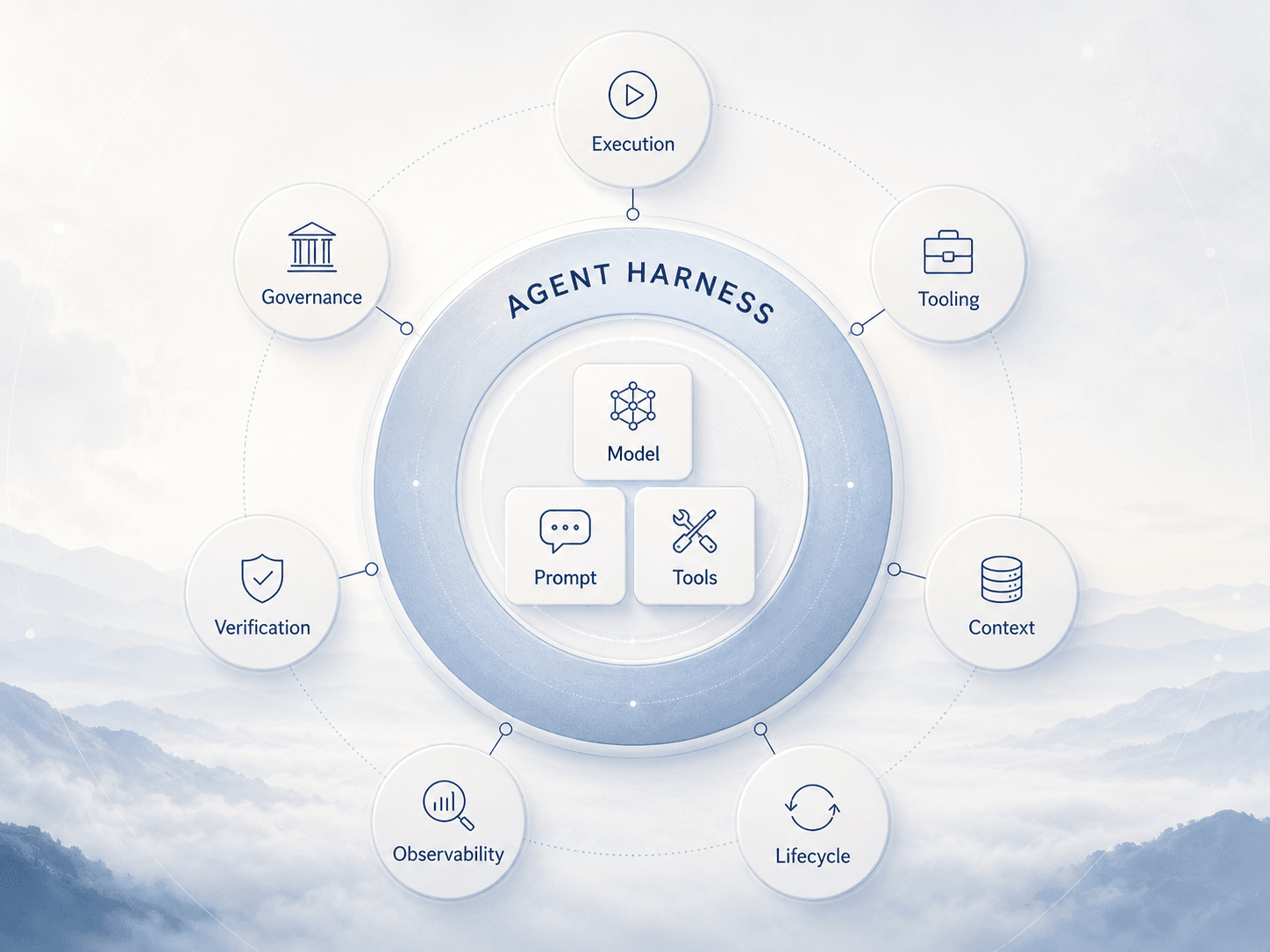
What Is an Agent Harness?
An agent harness is the execution and control layer around an LLM agent.
It is the system that turns a model from “something that can generate text” into “something that can act, observe, remember, recover, and be evaluated inside a real environment.”
A simple agent might look like this:
Model + Prompt + ToolsA more realistic agent system looks closer to this:
Model + Prompt + Tools + Runtime + Context + State + Monitoring + Evaluation + PermissionsThe harness is the part that manages those surrounding responsibilities.
A useful analogy is a car engine.
The model is like the engine. It produces power. But an engine alone is not a vehicle. You also need transmission, brakes, steering, sensors, a dashboard, safety systems, fuel management, maintenance routines, and rules for how the car is allowed to operate.
An agent harness plays a similar role. It does not replace the model. It makes the model usable inside a controlled system.
Why Prompts and Tools Are Not Enough
Prompts matter. Tools matter. But they are not enough for reliable agents.
A prompt can tell an agent what to do, but it cannot fully control where the agent runs, how long it runs, what it can access, how failures are logged, or how the final answer is checked.
A tool list can give an agent capabilities, but it does not solve questions such as:
- Which tool should be available for which task?
- What happens if a tool fails?
- Should the agent retry, stop, ask a human, or choose another path?
- How are tool results stored?
- What if the agent uses the right tool in the wrong way?
- What if the tool output conflicts with previous context?
- What actions are too risky to execute automatically?
This is why many early agent demos look impressive in short examples but become fragile in longer workflows.
A coding agent may edit the wrong file. A browser agent may click the wrong page element. A research agent may lose track of the original question. A multi-step assistant may accumulate errors across turns. A tool-using model may appear confident while relying on stale or incomplete context.
These failures are not always prompt failures. Often, they are harness failures.
The system needs better boundaries, better state handling, better observation, better evaluation, and better control.
Agent Harness vs Prompt Engineering, Context Engineering, and Agent Frameworks
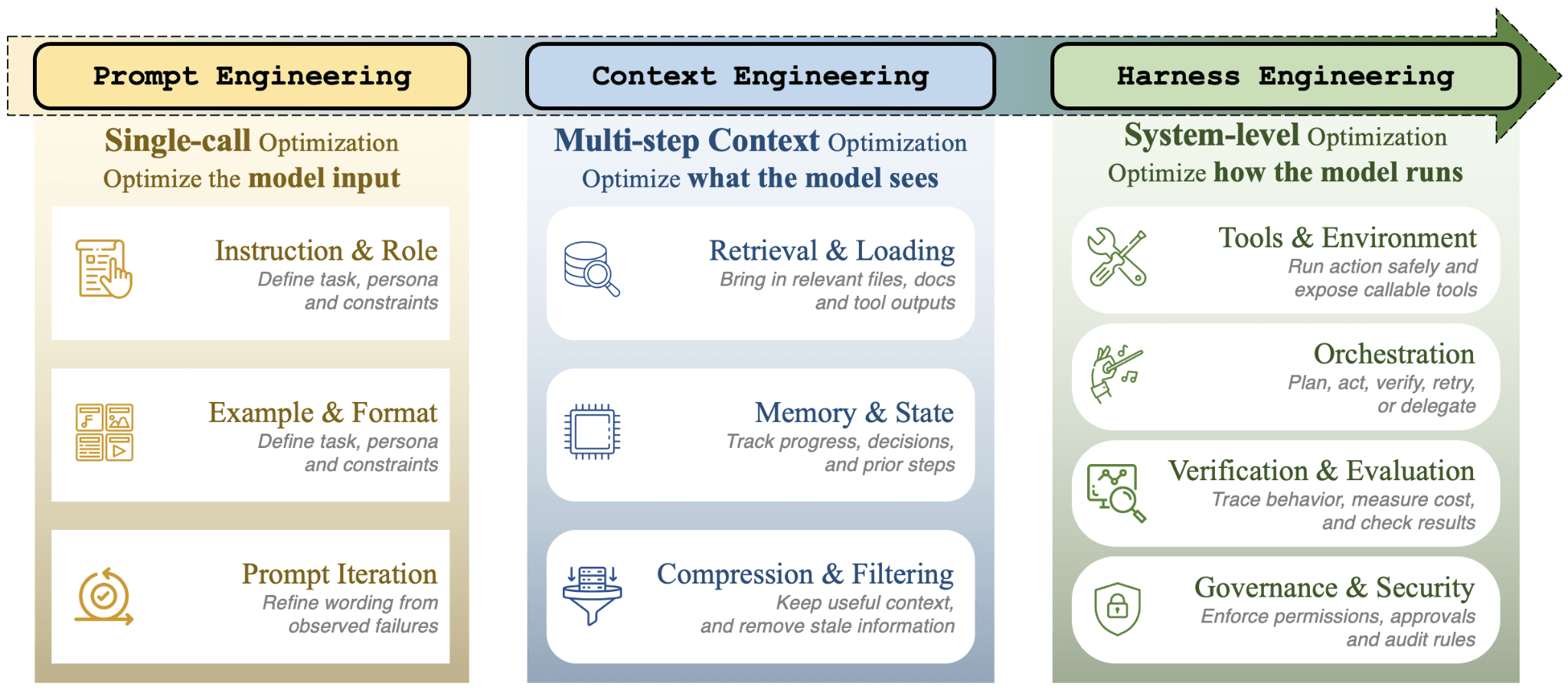
Agent harness engineering is related to prompt engineering, context engineering, and agent frameworks, but it is not the same thing.
Prompt Engineering
Prompt engineering focuses on the instruction given to the model.
It asks:
- What should the system prompt say?
- What examples should be included?
- What format should the answer follow?
- How should the model reason, plan, or respond?
Prompt engineering is still useful. But it mainly controls the model through language.
Context Engineering
Context engineering focuses on what the model sees at each step.
It asks:
- What documents should be retrieved?
- What history should be included?
- What should be summarized or compressed?
- What tool results should be shown?
- What should be forgotten?
- What should be preserved?
This becomes more important as agents work across longer tasks. A good agent needs more than a good prompt; it needs the right working memory.
Agent Frameworks
Agent frameworks provide reusable structures for building agents.
They may include abstractions for agents, tools, memory, workflows, planning, retrieval, and multi-agent coordination. Frameworks are useful because they reduce the amount of system code a builder needs to write from scratch.
But a framework is not automatically a complete harness.
A framework may help you build the agent loop. A harness asks whether the whole system is reliable, observable, testable, governable, and safe enough for the task.
Agent Harness Engineering
Agent harness engineering looks at the full wrapper around the agent.
It includes prompts and context, but also execution environments, tool protocols, lifecycle management, monitoring, evaluation, permissions, and governance.
In simple terms:
| Area | Main Question |
|---|---|
| Prompt engineering | What should we tell the model? |
| Context engineering | What should the model see? |
| Agent frameworks | How do we structure the agent workflow? |
| Agent harness engineering | How do we make the agent run reliably inside a controlled system? |
The Seven Layers of an Agent Harness
The paper organizes agent harness engineering into seven layers: Execution, Tooling, Context, Lifecycle, Observability, Verification, and Governance. Agent Harness Engineering: A Survey
These layers are useful because they separate concerns that are often mixed together when people talk about agents.
1. Execution: Where the Agent Runs
Execution is the runtime environment for the agent.
It answers questions such as:
- Does the agent run in a local process, container, sandbox, browser, virtual machine, or cloud environment?
- Can it execute code?
- Can it access the file system?
- Can it use a terminal?
- What network access does it have?
- What happens if it runs too long or consumes too many resources?
This layer matters because agents are not only generating text. They may be running commands, editing files, calling APIs, browsing websites, or operating software interfaces.
A coding agent without execution control is risky. A browser agent without navigation limits is fragile. A tool-using agent without runtime boundaries can create side effects that are hard to audit.
Execution is where agent capability meets system safety.
2. Tooling: How the Agent Uses External Capabilities
Tooling defines how the agent discovers, selects, and calls tools.
A tool can be anything outside the model:
- Search
- Database query
- File read/write
- Code execution
- Browser control
- Calendar access
- Email sending
- Payment system
- Internal company API
A weak tool layer simply gives the agent a list of functions and hopes the model uses them correctly.
A stronger tool layer defines:
- Clear tool schemas
- Input and output formats
- Permission boundaries
- Error handling
- Session state
- Tool availability by task
- Human approval for risky actions
Tooling is not only about adding more capabilities. It is about making capabilities legible and controllable.
More tools do not always make an agent better. Sometimes they make the system harder to predict.
3. Context: What the Agent Can See and Remember
Context is the information available to the model at each step.
This includes:
- The current user request
- System instructions
- Conversation history
- Retrieved documents
- Tool results
- Memory
- Intermediate plans
- Previous failures
- Current task state
Context is one of the main reasons agents fail quietly.
If the agent sees too little, it makes uninformed decisions. If it sees too much, it may lose the important signal. If the context is stale, compressed poorly, or missing provenance, the model may reason from bad assumptions.
A reliable harness needs rules for context:
- What gets retrieved?
- What gets summarized?
- What gets preserved?
- What gets discarded?
- What should be marked as uncertain?
- What should be refreshed before use?
For long-running agents, context is not just prompt content. It is state management.
4. Lifecycle: How the Agent Moves Through a Task
Lifecycle is the control flow of the agent.
It covers how the agent starts, plans, acts, observes, retries, pauses, hands off, and stops.
A simple agent loop might look like:
Think → Act → Observe → RepeatBut real tasks often need more structure:
- Start a task
- Clarify requirements
- Plan steps
- Select tools
- Execute actions
- Observe results
- Update state
- Handle errors
- Ask for approval
- Produce final output
- Save artifacts
- End safely
Lifecycle management becomes especially important when agents run for many steps or work across multiple systems.
Without lifecycle control, an agent may loop, drift, repeat actions, abandon constraints, or finish without verifying the result.
The harness decides not only what the agent can do, but how the work progresses.
5. Observability: How We Know What Happened
Observability is the system’s ability to record and inspect agent behavior.
It answers:
- What did the agent do?
- Which tools did it call?
- What did each tool return?
- What context did the model see?
- How many tokens were used?
- Where did latency occur?
- What failed?
- What changed between runs?
This matters because agent failures can be hard to diagnose from the final output alone.
If a code agent produces a broken patch, the important question is not only “Was the final answer wrong?” It is also:
- Did it misunderstand the task?
- Did it retrieve the wrong file?
- Did a tool fail?
- Did it ignore a test result?
- Did the context become polluted?
- Did it stop too early?
Without traces, logs, and operational signals, agent debugging becomes guesswork.
Observability turns agent behavior into something engineers can inspect.
6. Verification: How We Check the Result
Verification asks whether the agent’s output is actually correct.
This can include:
- Unit tests
- Static checks
- Benchmarks
- Human review
- Model-based evaluation
- Regression tests
- Constraint checking
- Tool-based validation
- Comparing output against known requirements
For many agent systems, verification is the difference between a demo and a usable workflow.
A model can produce a plausible answer. An agent can complete a sequence of steps. But the harness still needs a way to check whether the result satisfies the task.
For example:
- A coding agent should run tests where possible.
- A data agent should validate calculations.
- A research agent should preserve source grounding.
- A workflow agent should confirm that side effects happened as expected.
- A customer-support agent should follow policy constraints.
Verification closes the loop between action and reliability.
7. Governance: What the Agent Is Allowed to Do
Governance defines the rules, permissions, and boundaries around the agent.
It includes:
- Access control
- Security policies
- Human approval
- Audit trails
- Data handling rules
- Tool permission levels
- Organization-specific constraints
- Risk-based escalation
- Compliance requirements
Governance matters because agents can act.
Once an agent can write files, send emails, open pull requests, modify infrastructure, query private data, or trigger business workflows, it is no longer just a text generator.
It becomes part of an operational system.
The harness should define what the agent can do automatically, what requires confirmation, what should be logged, and what should never be allowed.
Governance is not only about preventing worst-case failures. It is about making the system accountable.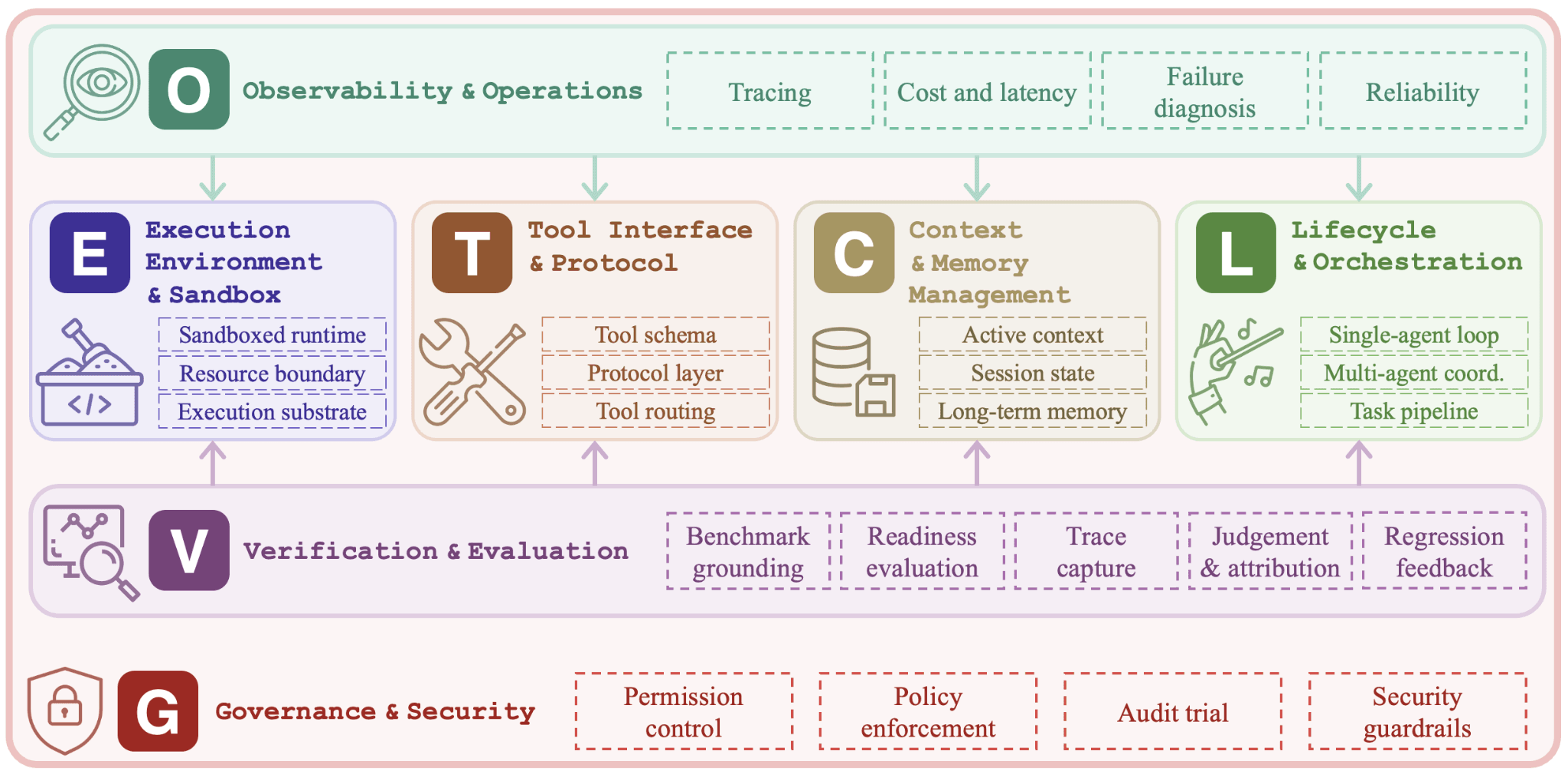
A Simple Example: A Coding Agent
A coding agent is a good way to understand the seven layers in practice.
Suppose an agent is asked to fix a bug in a repository.
- Execution defines where the agent runs: for example, inside a sandboxed container with access to the repository and test command.
- Tooling gives it controlled tools: read files, edit files, search the codebase, run tests, and inspect errors.
- Context decides what it sees: the user request, relevant files, previous test output, project conventions, and recent changes.
- Lifecycle controls the flow: understand the bug, inspect files, make a patch, run tests, revise if needed, and stop when the result is ready.
- Observability records what happened: which files were opened, what commands were run, what failed, and what changed.
- Verification checks whether the result works: tests pass, linting succeeds, and the patch matches the original requirement.
- Governance sets boundaries: the agent cannot push directly to production, access secrets, or make risky changes without approval.
In this example, the agent’s reliability does not come only from a better prompt. It comes from the system around the model.
Why These Layers Matter in Real-World Agent Systems
In a small demo, it is easy to ignore the harness.
A developer can write a prompt, add a tool call, run a loop, and show a useful result. For a single task with a friendly environment, that may be enough.
But real-world agents face messier conditions:
- Ambiguous user requests
- Changing context
- Tool failures
- Long-running tasks
- Partial progress
- Conflicting information
- Cost and latency limits
- Security constraints
- Need for auditability
- Repeated use by different users
- Integration with existing systems
This is where the harness becomes the difference between “interesting prototype” and “usable system.”
A better model may improve reasoning. A better prompt may improve instruction following. A better tool may expand capability. But none of them alone solves execution safety, state management, observability, verification, or governance.
The harness is where those concerns are designed together.
What This Means for Builders
For developers and product teams building LLM agents, the practical lesson is simple:
Do not design the agent only around the model call.
Design the system around the work the agent must safely complete.
Before adding more tools or rewriting prompts, ask:
- Where will this agent run?
- What actions can it take?
- What context does it need?
- How is state preserved?
- What happens when a tool fails?
- How do we trace its decisions?
- How do we verify the result?
- What requires human approval?
- What should be logged for audit?
- What should the agent never be allowed to do?
These questions may feel less exciting than model selection or prompt design, but they are often where reliability comes from.
For a simple assistant, a lightweight harness may be enough.
For a coding agent, the harness may need sandboxed execution, repository state tracking, test execution, patch verification, and rollback.
For a business workflow agent, the harness may need role-based permissions, approval gates, audit logs, and strict tool policies.
For a research agent, the harness may need source tracking, retrieval quality checks, contradiction handling, and citation verification.
The right harness depends on the task.
A Simple Way to Think About Agent Harness Engineering
A practical way to understand agent harness engineering is this:
Prompt engineering helps the model respond.
Context engineering helps the model see.
Tooling helps the model act.
Harness engineering helps the whole agent system behave.
That last word matters: behave.
A production-grade agent is not only judged by whether it can produce a good answer once. It is judged by how it behaves across repeated tasks, unexpected inputs, partial failures, tool errors, user constraints, and operational limits.
The harness is the structure that makes that behavior more visible, controllable, and testable.
Final Notes
The idea of an agent harness is useful because it moves the conversation beyond prompts and tools.
It gives builders a better vocabulary for the parts of an agent system that are often hidden until something breaks: runtime, tools, context, lifecycle, observability, verification, and governance.
This does not mean every agent needs a heavy platform. Many useful agents can stay small. But even small agents benefit from clear boundaries: where they run, what they can access, what they remember, how they are evaluated, and when they should stop.
As LLM agents become more capable, the hard part is not only making them do more.
It is making them do work in a system that can be inspected, trusted, corrected, and governed.
That is the basic promise of agent harness engineering.